Shortcuts and Navigation
Shortcuts
Note:
In order for the shortcut keys to work you need to make sure the Gantt tab has focus.
Mouse
| Mouse pointer location | Description | Affects |
|---|---|---|
| Ctrl + Mouse Wheel | ||
| Interval Grid | Zoom in and out | IntervalGrid, ResourceAxis, DateTimeAxis |
| DateTimeAxis | Zoom in and out | DateTimeAxis |
| ResourceAxis | Zoom in and out | ResourceAxis |
| Mouse Wheel | ||
| ResourceAxis, IntervalGrid | Scroll vertically | ResourceAxis, IntervalGrid |
| DateTimeAxis | Scroll Horizontally | DateTimeAxis, IntervalGrid |
Keyboard
| Keys | Description | Affects |
|---|---|---|
| Esc | Zoom out to maximum | Interval Grid, DateTimeAxis, ResourceAxis |
| Home | Move to the Horizon StartTime | DateTimeAxis, IntervalGrid |
| End | Move to the Horizon EndTime | DateTimeAxis, IntervalGrid |
| Ctrl + [h,d,w,m,y] | Set viewport to hour, day, week, month, or year | DateTimeAxis, IntervalGrid |
| Shift + [h,d,w,m,y] | Set the "step size" to hour, day, week, month or year | DateTimeAxis, IntervalGrid |
| Right Arrow (→) | Move the viewport to the right by the "step size" duration | DateTimeAxis, IntervalGrid |
| Left Arrow (←) | Move the viewport to the left by the "step size" duration | DateTimeAxis, IntervalGrid |
| Shift + Right Arrow (→) | Add "step size" to the viewport. Left side is fixed | DateTimeAxis, IntervalGrid |
| Shift + Left Arrow (←) | Substract "step size" to the viewport. Left side is fixed | DateTimeAxis, IntervalGrid |
| Ctrl + Right Arrow (→) | Add "step size" to the viewport. Right side is fixed | DateTimeAxis, IntervalGrid |
| Ctrl + Left Arrow (←) | Substract "step size" to the viewport. Right side is fixed | DateTimeAxis, IntervalGrid |
| Ctrl + R | Zoom out to maximum on the ResourceAxis only | ResourceAxis, IntervalGrid |
Navigation
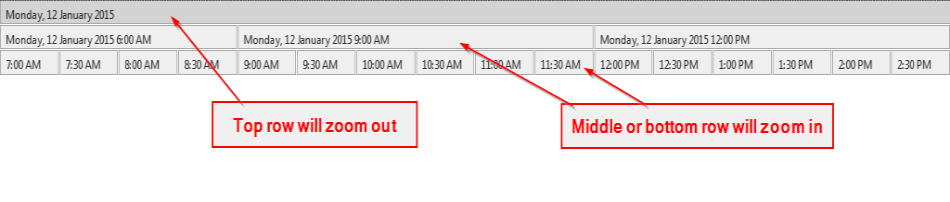
Clicking on rectangles on the Date Time Axis will allow you to zoom in or out of the specified time range.
- The top row rectangle will zoom out
- The middle and bottom row rectangles will zoom in